Verifying Dead by Daylight's Files
In a couple of cases, like when you delete the contents of the icons folder it's a good idea to verify your game files. By doing this, the game launcher will validate that all the files it's expecting exist & are intact, and if not, re-download them. This helps you err on the side of caution with any potential anti-cheat or game corruption issues.
As the game isn't exactly small, verifying the files might take a little while to complete.
The process for verifying the game files varies by store, the instructions for each are below:
Steam
- In your game library, right click on
Dead by Daylightthen clickProperties.

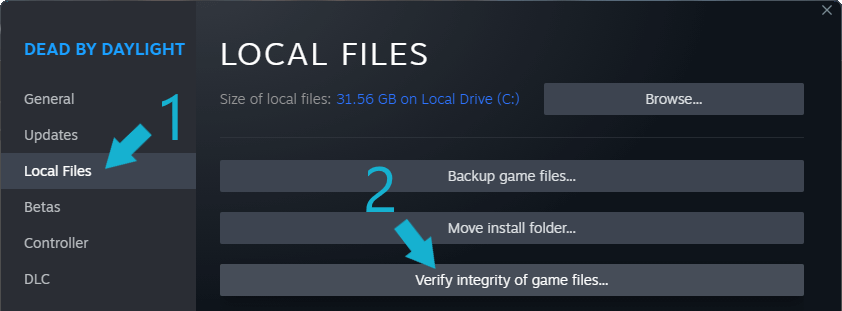
- In the window that opens, click
Local Filesand thenVerify integrity of game files...
Epic Games Store
- In your game library, click on the
…on the Dead by Daylight card and then clickManage.
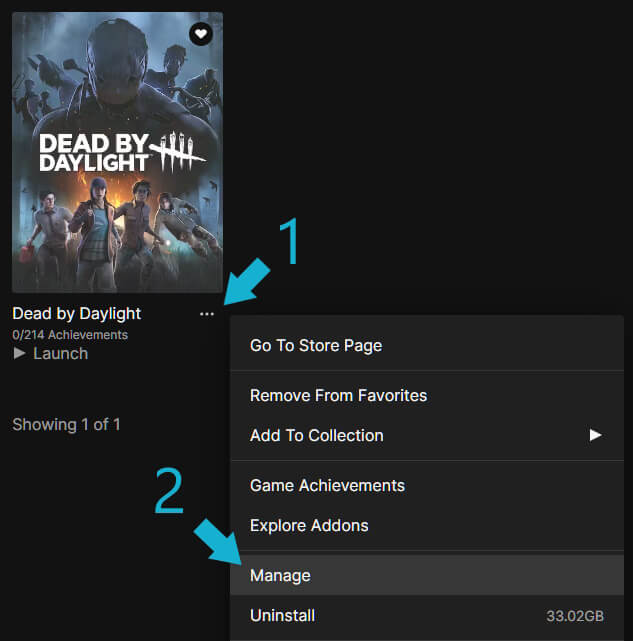
- In the window that opens, click
Verify

Windows Store
- In your game library, right click on
Dead By Daylightand then clickManage.

- In the modal that opens, click
Filesand thenVerify and Repair
